
Lambda From Scratch
Introduction
How Lambdas work
Normally, we use the AWS SDK to create Lambda functions, and it helpfully hides most of the messy details. But it’s worth taking a peek under the covers, to see what’s actually happening inside a Lambda. In this article, we’ll create and deploy the most basic possible Lambda function, in Rust, using only reqwest and serde_json.
Stripped down to the essentials, a Lambda function is simple. There’s the initialization phase (done at the start of main()), where things like database connections are created. Then the Lambda effectively runs this loop:
- Get a request (in JSON).
- Do something with it.
- Post a response (also in JSON).
The function will block at step 1, waiting for a request to process, until it either receives a request or is terminated by AWS (which will happen after some period of time with no incoming requests).
Getting the request is done by querying a specific well-known endpoint, provided by AWS in the environment in which the Lambda function runs. Similarly, the response is sent to another well-known endpoint. There is also a third endpoint to which error responses are sent, which we won’t implement in this article.
The request and response in this example are very simple. The raw request shown in the next section is what you get from direct invocation. When Lambdas are invoked by other parts of AWS (API Gateway, SQS, etc), the request and response payloads have more boilerplate. We’ll examine these cases in a future installment.
Building a Lambda from scratch
Create the (empty) Lambda function
To start with, create a Lambda function called lambda_impl in AWS. You can do this using the aws lambda create-function command, but it’s easier to use the AWS Console, since it creates the necessary IAM role at the same time. From the Console, navigate to Lambdas, then click Create Function. From there:
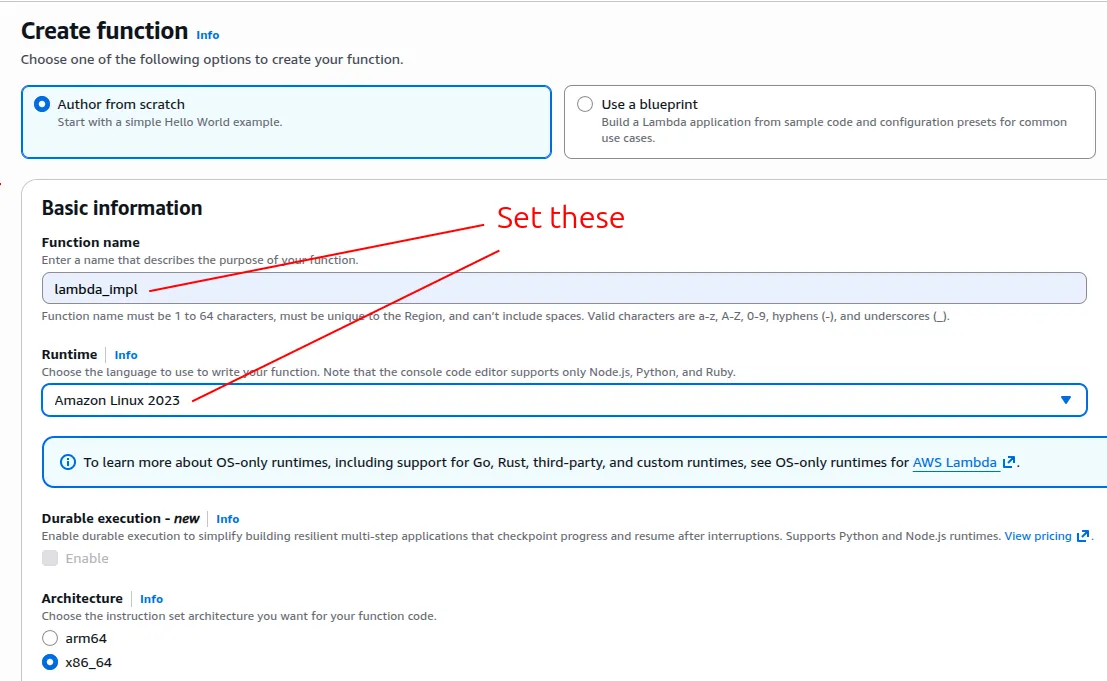
Note: this screenshot was correct as of Jan 2026, but Amazon changes their UI from time to time
Build the Lambda
We now have an empty Lambda function with the name lambda_impl. Next we need to implement it.
Here’s the most basic possible Lambda implementation, using the Lambda Runtime API directly:
/* Cargo.toml
[package]
name    = "lambda_impl"
version = "0.1.0"
edition = "2024"

[dependencies]
reqwest         = { version = "*", default-features = false, features = ["blocking", "json"] }
serde_json      = { version = "1" }
*/

use reqwest::blocking::Client;
use serde_json::{Value, json};

fn main() {
    // AWS will ensure that this (and several other) env vars are set
    let runtime_api = std::env::var("AWS_LAMBDA_RUNTIME_API").unwrap();

    let client = Client::new();
    loop {
        // Get the Lambda request
        let (request_id, request) = get_request(&client, &runtime_api);

        // Simulate the working of the Lambda
        std::thread::sleep(std::time::Duration::from_secs(1));

        // Send the dummy response. For demonstration purposes, if the
        // incoming request has a field called "ReturnFieldName", the
        // value of that field will be copied to the response.
        let response = json!({
            "A": request["ReturnFieldName"].as_str().unwrap_or("Filler"),
            "B": "bbb",
            "C": 123
        });
        send_response(&client, &runtime_api, &request_id, &response);
    }
}

// Returns request ID and body
fn get_request(client: &Client, runtime_api: &str) -> (String, Value) {
    let url = format!("http://{runtime_api}/2018-06-01/runtime/invocation/next");

    // Sometimes need to try a few times
    let mut msg_response = None;
    for _ in 0..3 {
        let r = match client.get(&url).send() {
            Ok(r) => r,
            Err(e) => {
                println!("{e:#}");
                std::thread::sleep(std::time::Duration::from_millis(50));
                continue;
            }
        };
        msg_response = Some(r);
        break;
    }

    let msg_response = msg_response.expect("Could not get a request");

    let request_id = msg_response
        .headers()
        .get("lambda-runtime-aws-request-id")
        .unwrap()
        .to_str()
        .unwrap()
        .to_string();
    let lambda_request: Value = msg_response.json().unwrap();
    (request_id, lambda_request)
}

fn send_response(client: &Client, runtime_api: &str, request_id: &str, response: &Value) {
    let url = format!("http://{runtime_api}/2018-06-01/runtime/invocation/{request_id}/response");
    client.post(url).json(response).send().unwrap();
}
The “2018-06-01” in the URLs is the date version, specified by AWS.
Deploy the Lambda
There are numerous ways to deploy this Lambda function to AWS, such as a CI pipeline, or the handy cargo lambda tool. But we’re trying to minimize dependencies, so we’ll keep it basic and just use the aws tool.
We’ll build the Lambda using the MUSL build, to avoid libc incompatibility issues between your build environment and the Lambda runtime. The MUSL build increases the size of the executable, but in my experience, the increase is minimal (~1%).
cargo build --release --target x86_64-unknown-linux-muslTo deploy, the executable must be named bootstrap. So:
cp target/x86_64-unknown-linux-musl/release/lambda_impl bootstrap
strip bootstrap
strip removes all debug info from the executable. That step isn’t necessary, but we might as well reduce the executable size.
Next we zip it up:
zip -j lambda_impl.zip bootstrapYou can upload the executable zip file directly to your Lambda function, but there’s a size limit that you might run into, so to sidestep that, we’ll go via S3:
aws s3 cp lambda_impl.zip s3://my-bucket/lambda_impl.zipThen deploy the zip file:
aws lambda update-function-code \
    --function-name lambda_impl \
    --s3-bucket my-bucket \
    --s3-key lambda_impl.zip
Your lambda_impl Lambda function is now deployed. It can be tested in AWS Console, and invoked in the usual ways.